
Most campaigns don't fail at launch. They fail in the middle: a budget runs out a week before the big weekend, a wrap flight ends just as the season starts, the creative deadline for the next flight slips by while everyone is watching the current one. The information to catch those moments existed, just never in one place.
Vugo Planning is that place. It's a new board inside Vugo Platform that shows every flight you have, the moments in your markets that matter, and the decisions waiting on you, on one six-month timeline. It's live now for every advertiser and agency on the platform.
Six months on one board
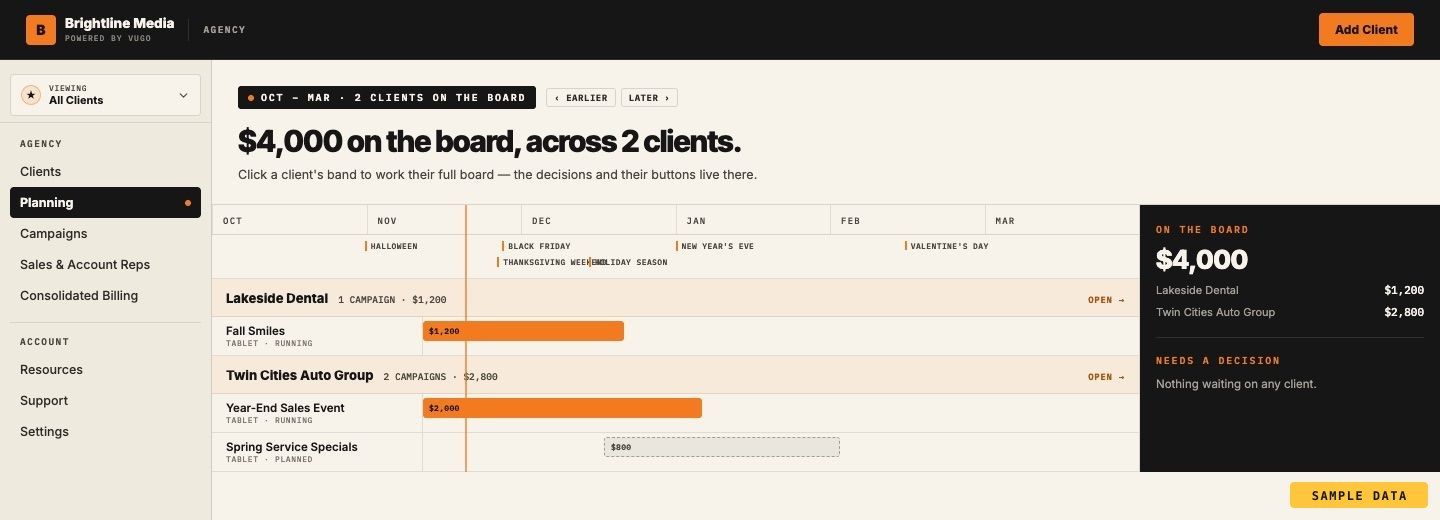
Open Planning and you see your campaigns laid out by market across six months. A running campaign is solid, a booked one is outlined, and one you're still planning is dashed, so you can tell at a glance what's live, what's coming and what's still an idea. A line marks today, and Earlier and Later move the window three months at a time.
Along the top runs a layer of moments in market: Halloween, Black Friday, the holiday season, New Year's Eve, Valentine's Day and the other dates that change how people move through a city. Seeing them on the same line as your flights makes the question obvious. Is anything running when it counts?
Beside the timeline, Money on the board totals what's committed in the window, and a lead-times strip shows how far ahead wrap installs are booked and when creative is due for review. A wrap starting soon needs its fitting booked well ahead, and the board says so before it becomes a problem.
The decisions, with the buttons
The right side of the board is a short list called Needs a decision. It only shows things that need you, and each one comes with the answer built in.
- A screen campaign running out. The card says when it runs out, what's left, and how fast it's delivering. One button adds a top-up already worked out from the campaign's own pace. The other, Let it end, is just as easy, and the board remembers you chose it.
- A wrap flight ending. Extend a month offers each driver on the campaign the extra month. Every driver opts in, and you're billed only for the cars whose drivers agree.
- Installs to book and creative that's due. The board names the date a fitting has to be booked to hold your start date.
That's the difference between a calendar and a plan. A calendar shows you the end date; Planning asks whether you want it to be the end.
A Plan B you can show anyone
Most planning conversations come down to "what if we ran a little longer?" Planning answers it on the board. Turn on Plan B and a running screen campaign gets one more month at its current pace, drawn as a ghost on the timeline, with three numbers beside it: the estimated validated impressions it adds, what it adds to the money on the board, and the new end date.
Nothing is submitted from a scenario. Switching redraws the board and nothing else, so it's safe to explore with a client in the room, or with a CFO who wants to see both versions before signing off.
A media plan you can hand to a client
When the plan is ready, Export media plan · PDF turns the board into a document: the flight schedule, the market moments in the window, scheduled swarms, what needs a decision and the money on the board. If Plan B is switched on, the PDF adds a comparison page, Plan A against Plan B, so the choice and its cost are on paper. A flight schedule CSV is there too, for anyone who lives in spreadsheets.
For an agency, this is the approval step made simple. Build the plan, export both versions, send them to the client, and make the change they choose.
Suggestions tied to the calendar
Planning also points out what you might be missing. When a moment is coming up in a market where you already have wrapped cars, the board suggests a swarm: your campaign's wrapped drivers brought to one place or route for the hours that matter. When a moment is coming up in a market where you have nothing booked, it suggests starting a campaign. Each suggestion names the moment and why it's there, with one button to act on it and one to dismiss it. Dismiss it, and it won't come back.
Test the creative, not just the calendar
Planning works alongside A/B testing, new for in-vehicle screen ads. On a live screen campaign with two to four approved versions, start a test from the campaign's creative panel. The cars carrying your campaign are split evenly between the versions: each car shows one version for the whole day, and the pick is made again each day. The test changes which version a car shows, never how often your campaign plays.
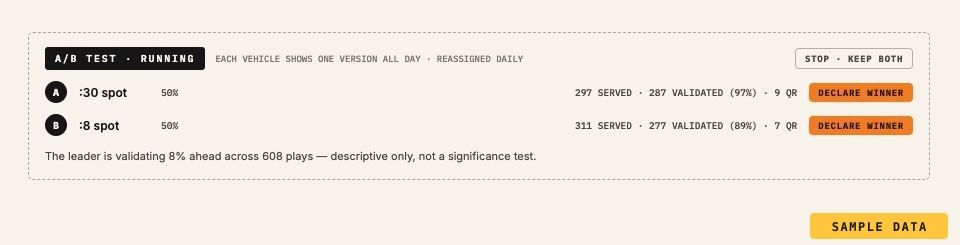
Results show each version's served plays, validated plays and QR scans since the test began. When you've seen enough, Declare winner puts that version on every car, or Stop · keep both ends the test with both versions kept.
Built for agencies with many clients
Agencies get Planning across their whole book. The agency board shows six months with a band for each client and that client's campaigns beneath it. On the board totals the window and shows each client's share, and Needs a decision gathers what's waiting on any client, so nothing slips because it lived in someone else's account. Click a client's band to open that client's own board and act on it.
A matching Campaigns list shows every campaign across every client in one table, filtered by client, status and market. Account reps see the clients assigned to them. Together with the media plan PDF and Plan B, an agency can walk into a quarterly review with every client's calendar, the decisions coming up and a priced option for each.
How to use it
A few ways teams are putting Planning to work:
- Plan around the moments first. Start from the moments layer, then check every market for coverage in the weeks that matter most to your brand.
- Keep one standing Plan B. Before each check-in, turn on Plan B for the campaign doing best and bring the comparison page to the meeting.
- Clear the decisions weekly. Ten minutes on Needs a decision each week means no campaign ends by accident.
- Pair a test with an extension. Extend a strong campaign and test a new version in the same month, so the extra time also tells you which message works.
- Plan wraps a season out. Wraps are recruited and installed for each campaign, so put the next season's flight on the board early and let the lead-time strip set the schedule.
Vugo Planning is in Vugo Platform today: sign in and choose Planning. New to Vugo? See how Planning works, read the specs for every format, or talk to us about your next campaign.